Submit Ally Support Cases
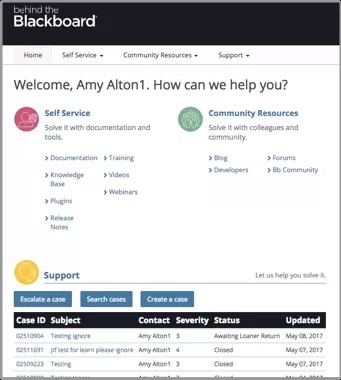
Behind the Blackboard is where you can create support tickets for Anthology Ally.
Site administrators have accounts created in Behind the Blackboard (available in English only).
You should receive an email with the credentials to login. If you don't see that email please contact your Blackboard representative.
When should I create a support case?
Create a support case when:
- You have any system issues or errors
- You need help with your system
- You have questions you need answers to quickly
Create a support case ticket
- Login to Behind the Blackboard.
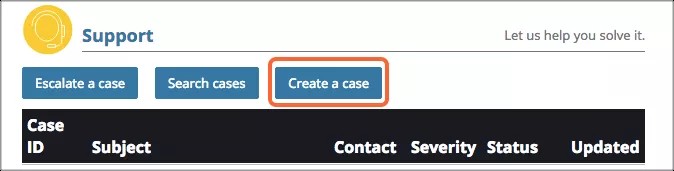
- Select Create a case under the Support section.
- Fill in the required form information, being as specific as possible. Please include a URL link to where the issue is happening in the site.
- Type the issue in the Subject/Error Message text box.
- Type a detailed description of the issue or error message in the Description text box.
- Include any relevant links, location names, or any other information that can be provided at the time.
- Provide screenshots where possible and links to any content items you're having difficulties with.
- Attach the actual file, if possible.
- Provide specific, exact steps to replicate in the Steps to Replicate text box. An example would be:
Provide as much information as you can. Include if the issue is happening for a specific role or user, in a specific browser, in one location or multiple locations, and any other information that has been discovered.
- If you need to login
- The course or domain you need to go to
- The location of the content item
- Chose the severity level of the case. Please use the following definitions of the severity levels.
- Severity 1: Emergency. Production system is down. System is non-functioning, disabled, or non-responsive.
- Severity 2: High. Product is functioning, but major components are unusable/unavailable.
- Severity 3: Medium. Product is operating close to normal, however minor components are functioning abnormally.
- Severity 4: Low. Product enhancement request, all sandbox issues, or instructional assistance is needed.
- Select Create Case to save and create the case.
After you create a support case you can use Behind the Blackboard to monitor your cases and communicate with Blackboard Client Support.
How to escalate BtBb tickets?
- Log in to Behind the Blackboard
- Locate an open case you would like to escalate. Recent cases will show directly after you log in. If you do not see it on the list, you can use the Search Cases button to find it. Closed cases will not show the escalate option.
- Select your case number to open the case. Here you can review any prior communications that may be there.
- Select the Escalate Case button on the top ribbon.
- Next, choose the most appropriate escalation reason from the picklist.
- Enter your escalation comments in the available text field.
- This field is limited to 255 characters. If you need more space please add to your case as a comment after you escalate.
- Select the Submit button when you are finished with the message and ready to escalate.
Once you have followed the steps above, an immediate notification is sent to the case owner and their manager, that you have escalated your case. That notification includes the comments that you entered as well.
Video Demonstration of Case Escalation
A case can only be escalated one time. After you have escalated an issue, the Escalate Case button will no longer show when reviewing the case. We will treat this case as an escalation until it is closed.


 Allyユーザグループに参加する