Looking for the latest release information? Check out the Blackboard Learn SaaS release notes feed.
More on Learn with the SaaS Deployment | How to enable the Ultra experience
Browse the list of features or view the maintenance items.
You can also see our instructions to create and export a list of Known Issues in Behind the Blackboard.
Check earlier versions' notes at the end of this page.
Learn SaaS release 3900.86.0
Blackboard Learn SaaS Continuous Delivery v3900.86.0
Release to Test/Stage: Tuesday, 6 February 2024 | Release to Production: Thursday, 7 March 2024
Original Experience, Ultra Experience
Original Course View, Ultra Course View
For full feature details, please review the corresponding notes for the Learn 3900.86.0 version included below on this page. Details can also be found Behind the Blackboard.
Latest release: 3900.86.0-rel.49+1802b14 to Production servers to take place on 28 March 2024.
For more information on updates and bug fixes, please visit Behind the Blackboard.
March 2024 – 3900.86 Release
The March 2024 - 3900.86 release is robust with features in 10 areas:
- Instructional design;
- Competency based education;
- Tests and assignments;
- Communication and collaboration;
- Flexible grading;
- Gradebook;
- Learner progression and personalized experience;
- Integrations;
- Learn core and security, and;
- Upgrade to Ultra
These improvements impact instructors, students, and administrators. Some features do require administrative action.
Instructors:
- AI Design Assistant – Context picker for test question generation
- Goal alignment to Journals
- No Due Date assessment setting
- Last used view state of flexible grading side panels preserved
- Gradebook item statistics
- Text grade schema converts to points
- Send messages to students from the Student Activity report for assessments on small and medium devices and the mobile app
- Moodle conversion improvements
Instructors and Students:
Administrators:
Integrations
Converting Building Block content to LTI: MediaSite course content – 3900.86
Blackboard Learn SaaS, Blackboard Learn 9.1
Original Experience
Original Course View
Impact: Administrators
Related topic: Convert Building Blocks to LTI
Mediasite, a comprehensive rich media system, integrates with Original courses via building blocks. With building block support ending, administrators can now use the conversion tool with Mediasite content.
The tool currently supports the conversion of content embedded with the content editor and mashup links. The conversion tool transitions Mediasite for content links from Building Block to LTI.
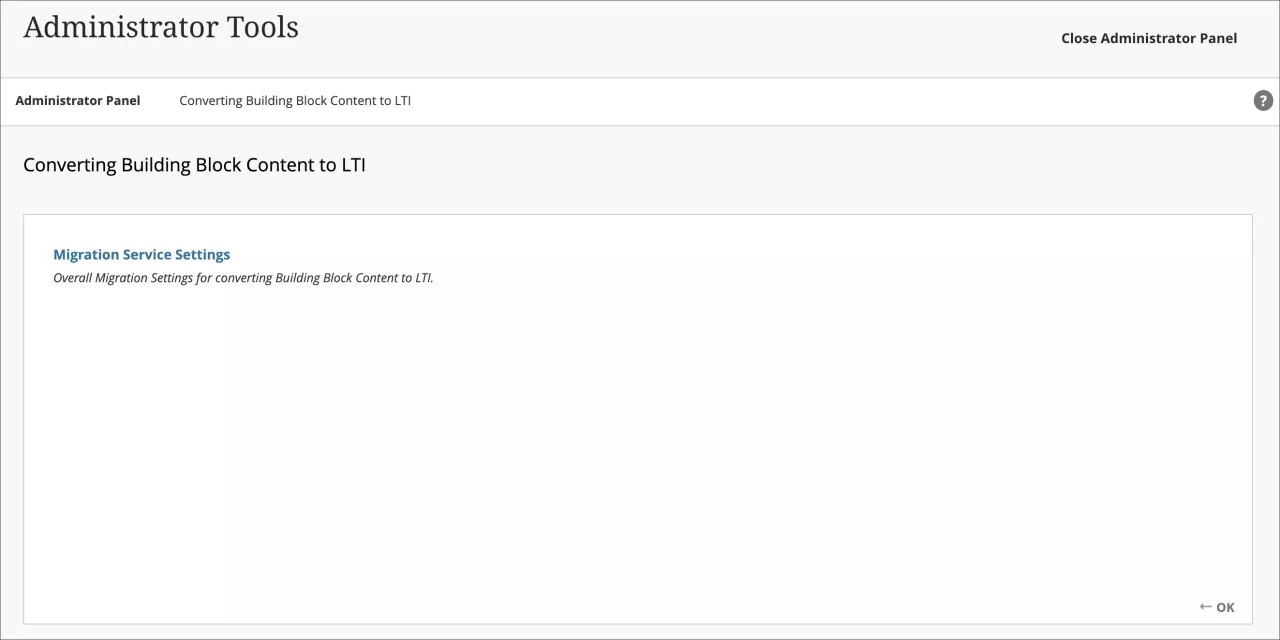
Image 1. The administrator accesses the tool to convert Building Block content to LTI
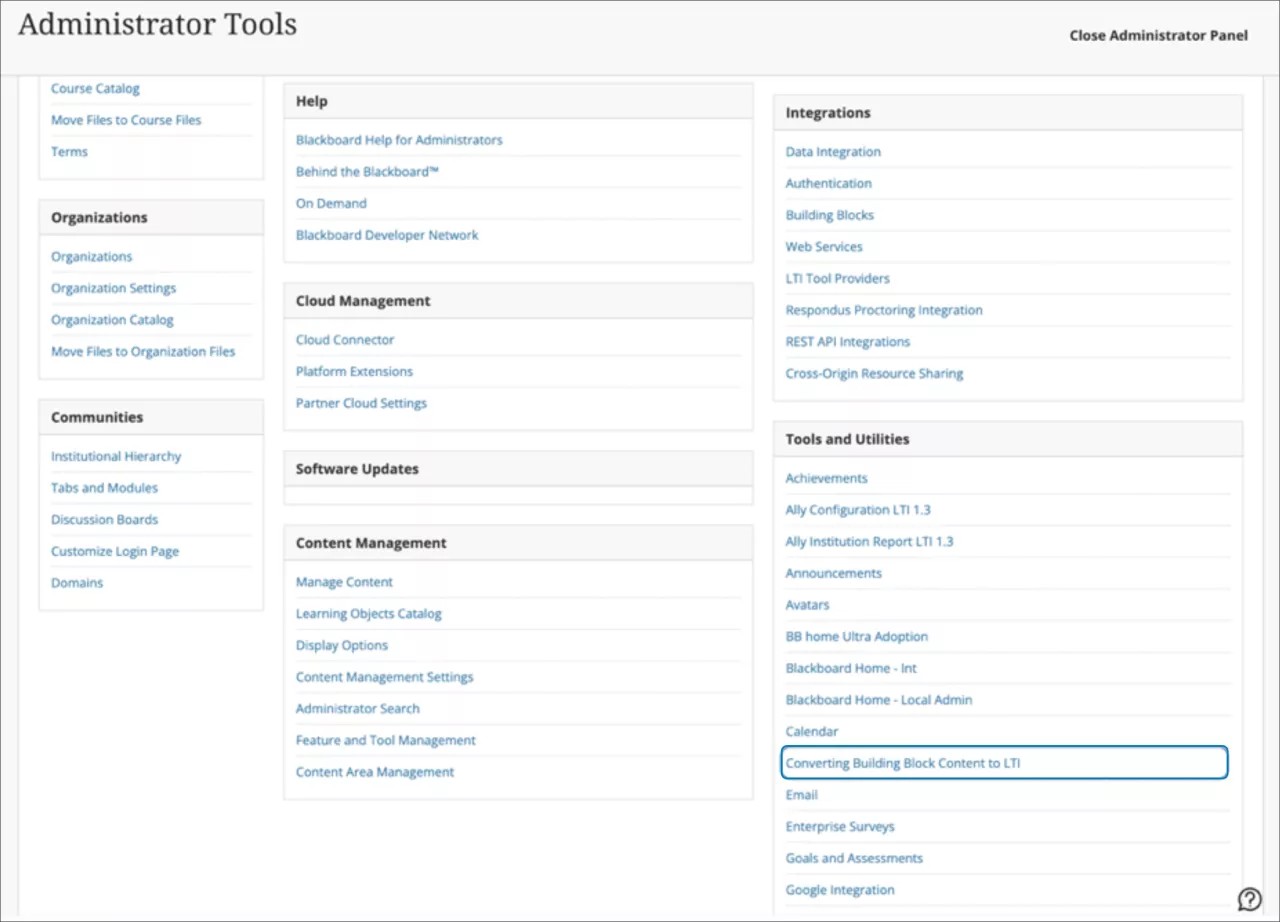
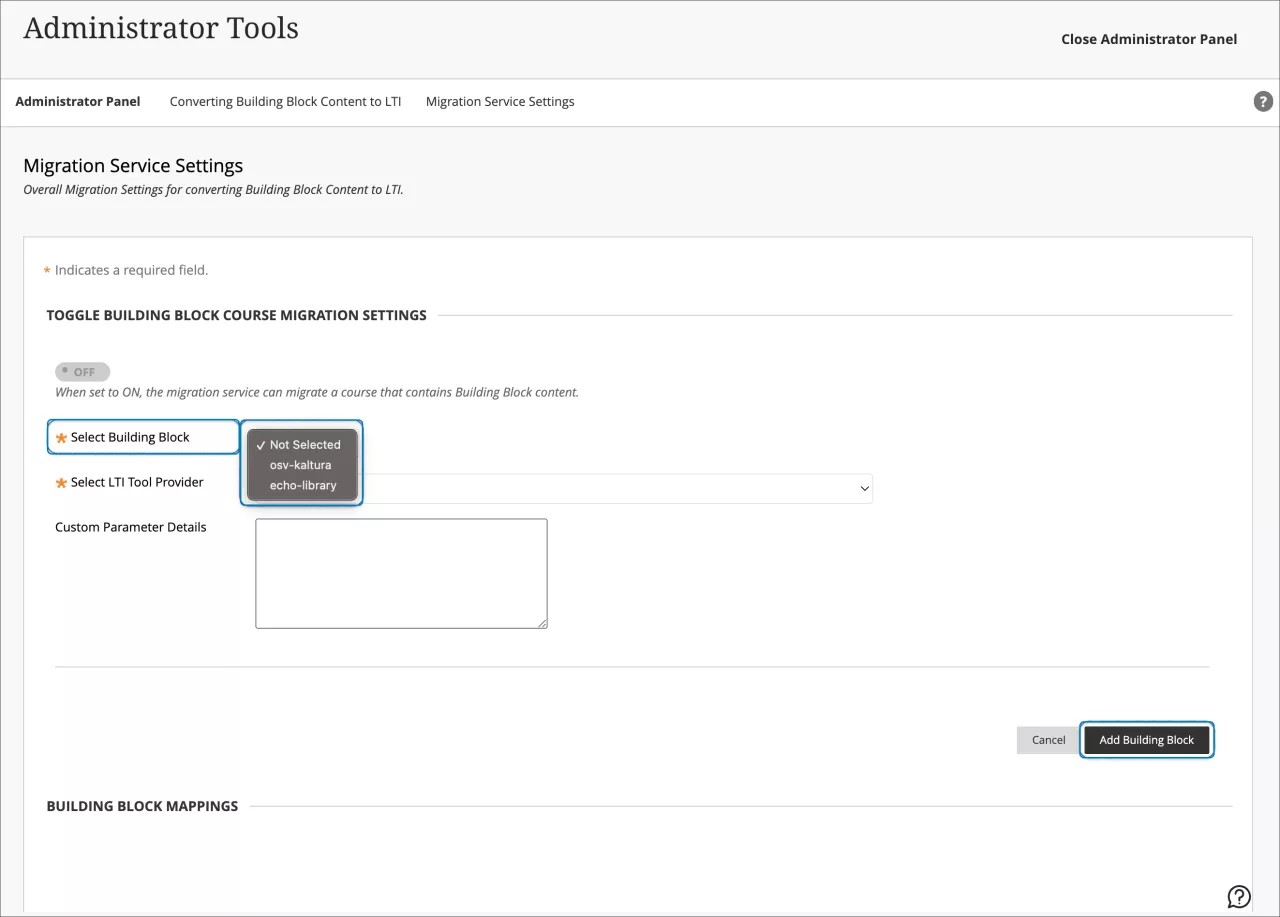
Image 2. The administrator selects the MediaSite Building Block and maps Building Block tools to LTI placements
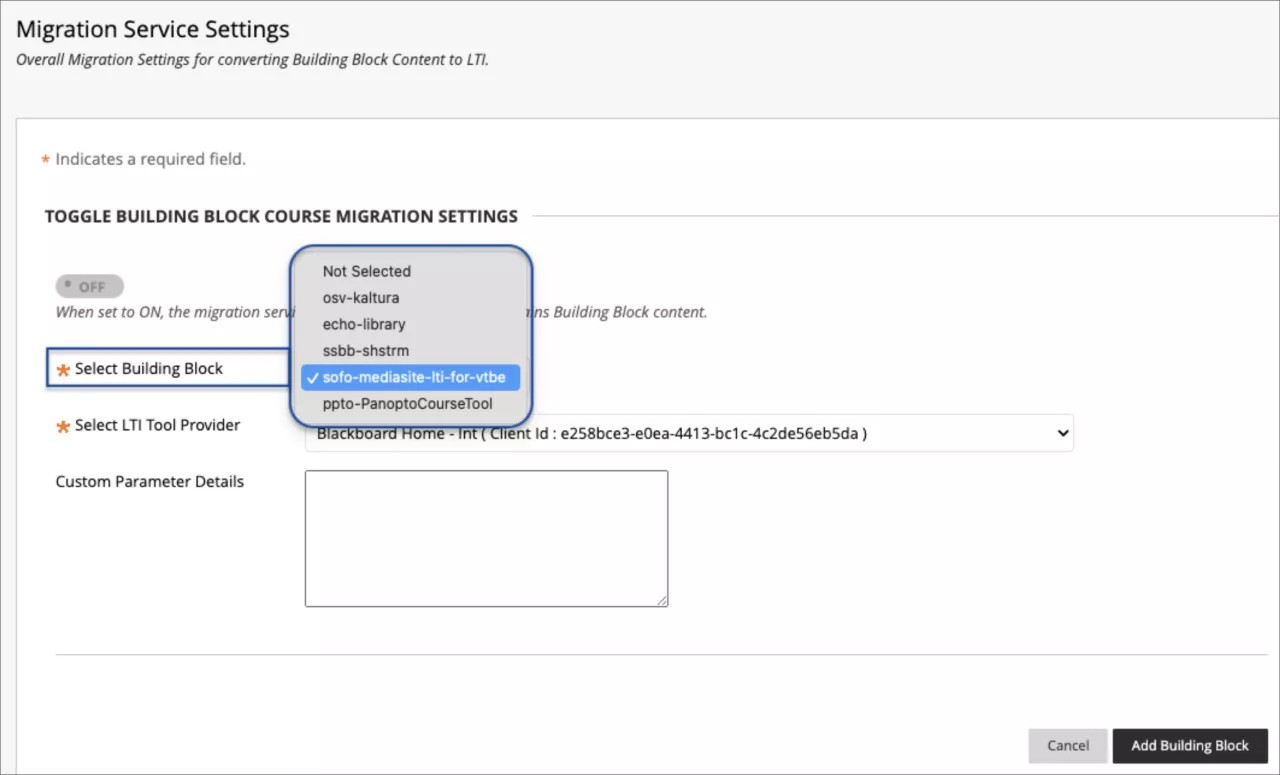
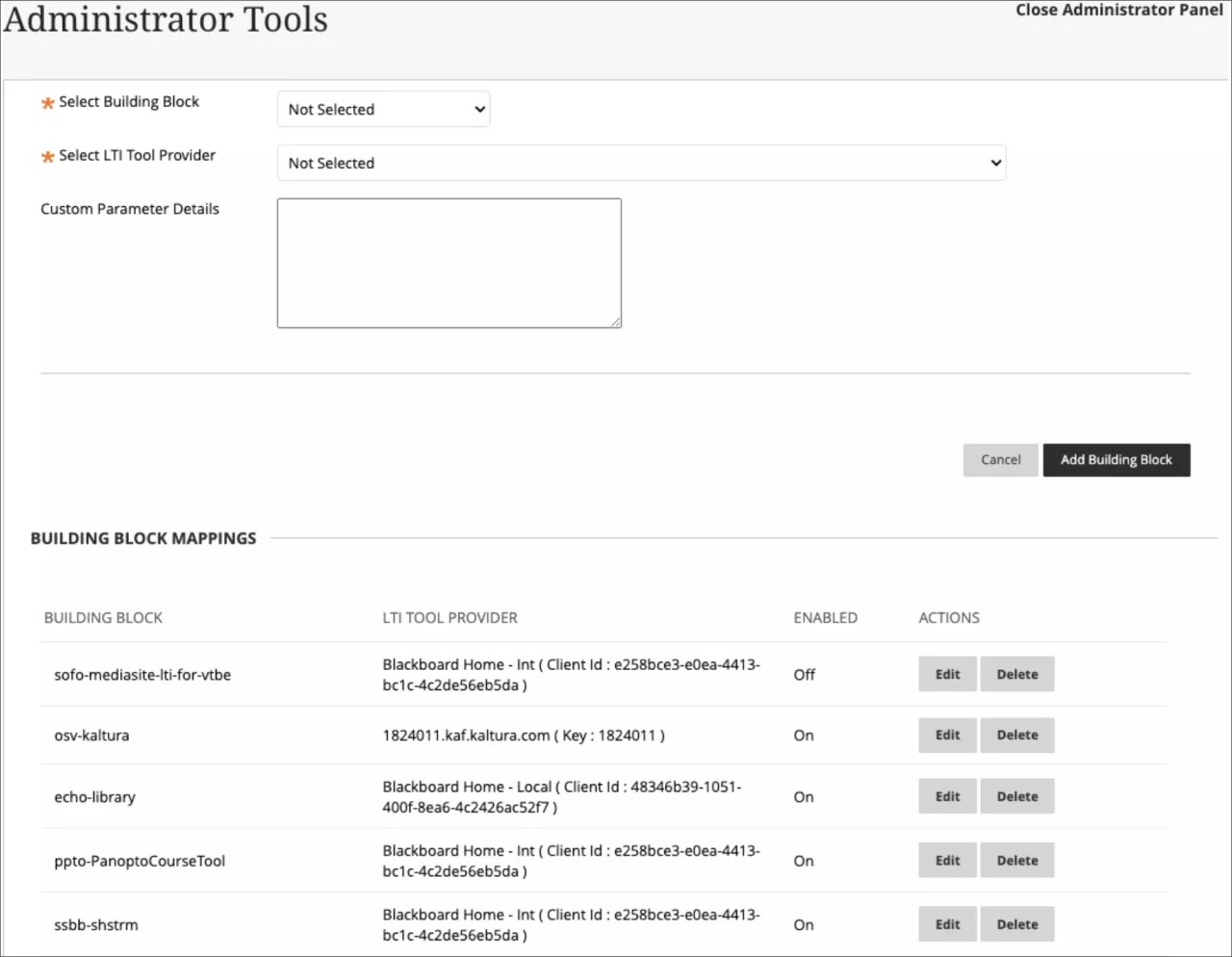
Administrators must configure the MediaSite LTI integration before converting links. Custom parameters will not be required for this configuration.
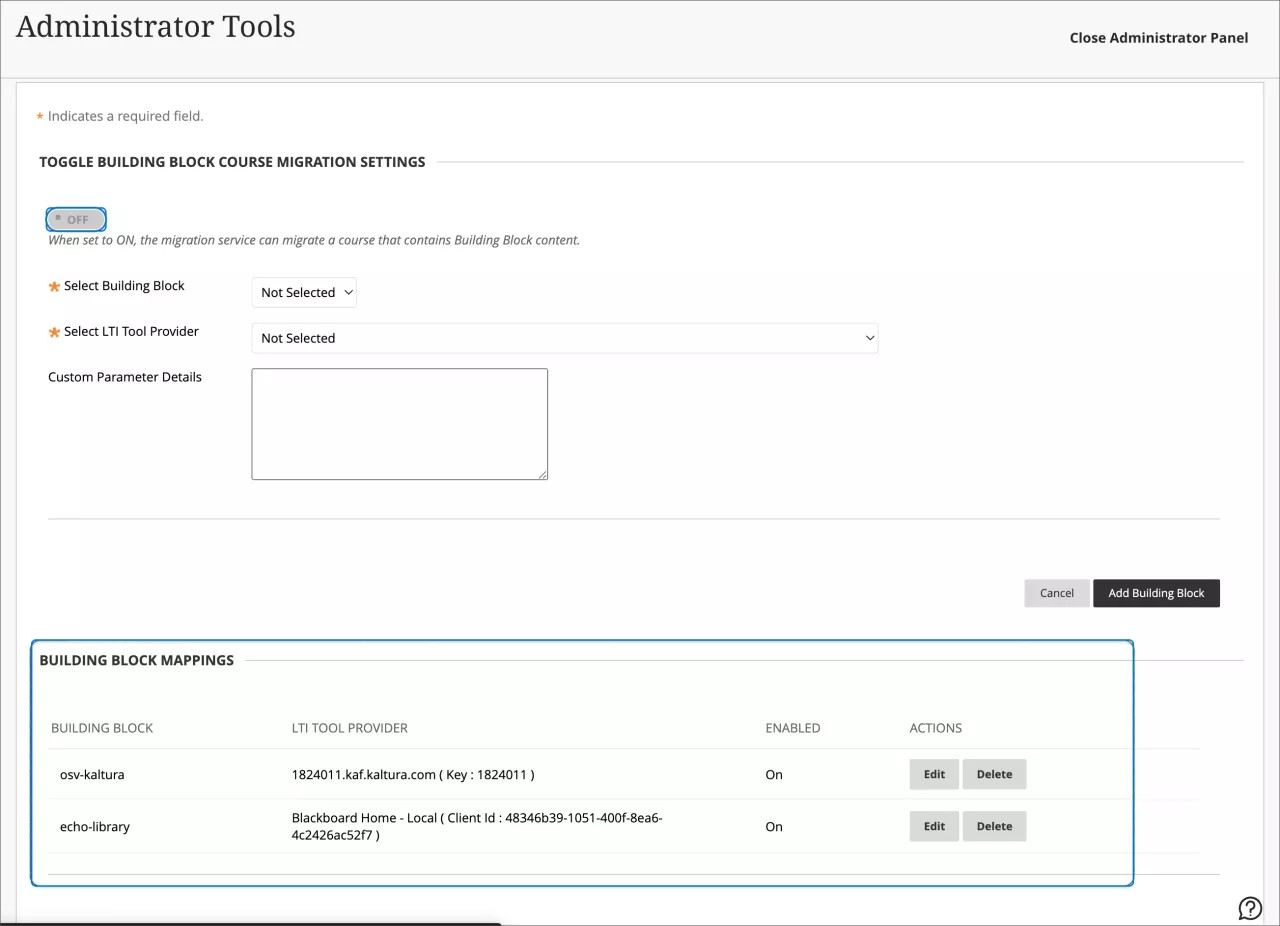
Image 3. Building block mappings can be viewed and edited
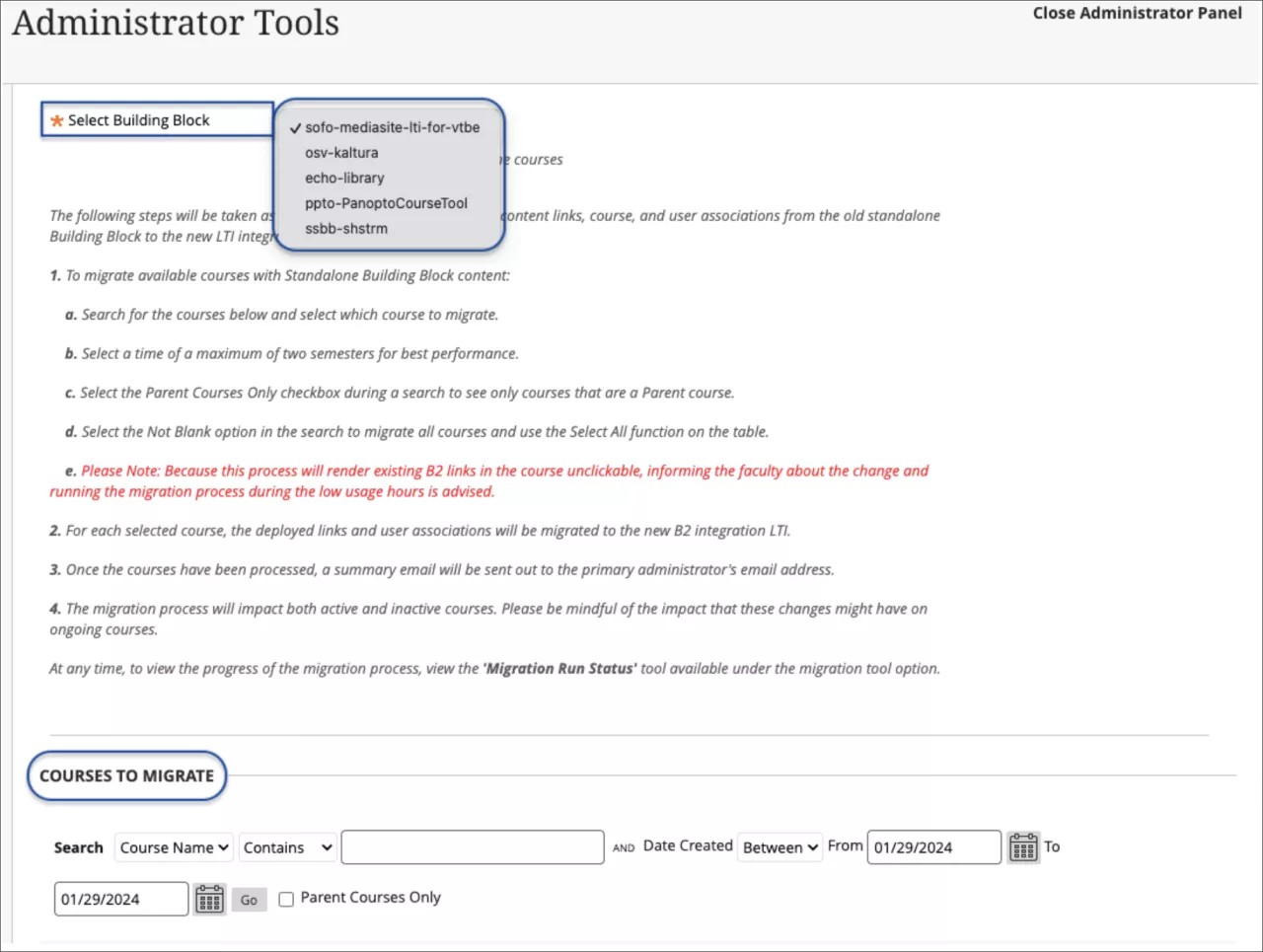
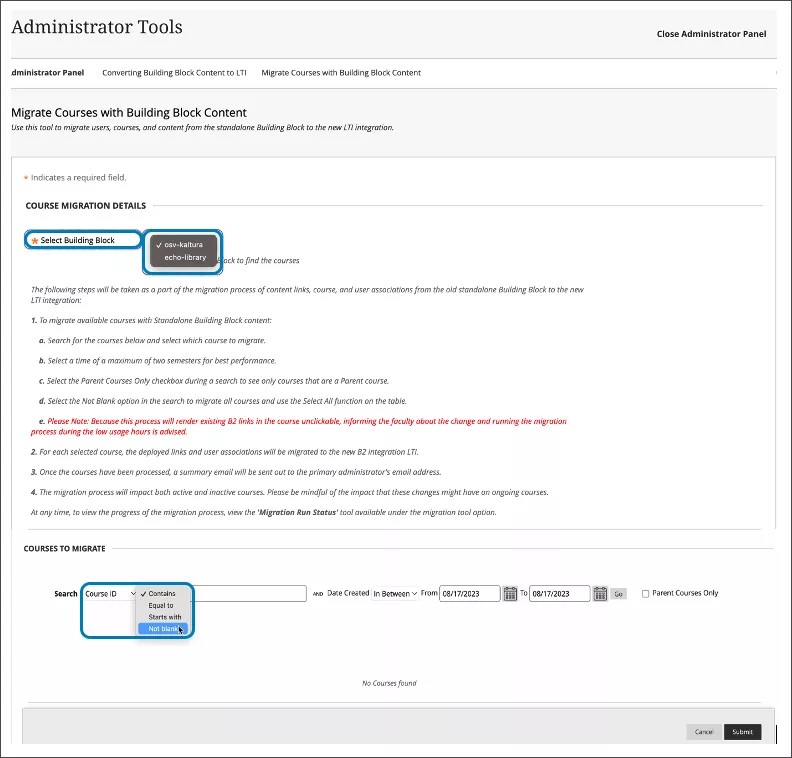
Next, an administrator will choose courses to be scanned for MediaSite links. Select the MediaSite Building Block. Use the course search tool to select courses for link migration.
Image 4. The administrator selects the ShareStream Building Block and chooses courses to migrate
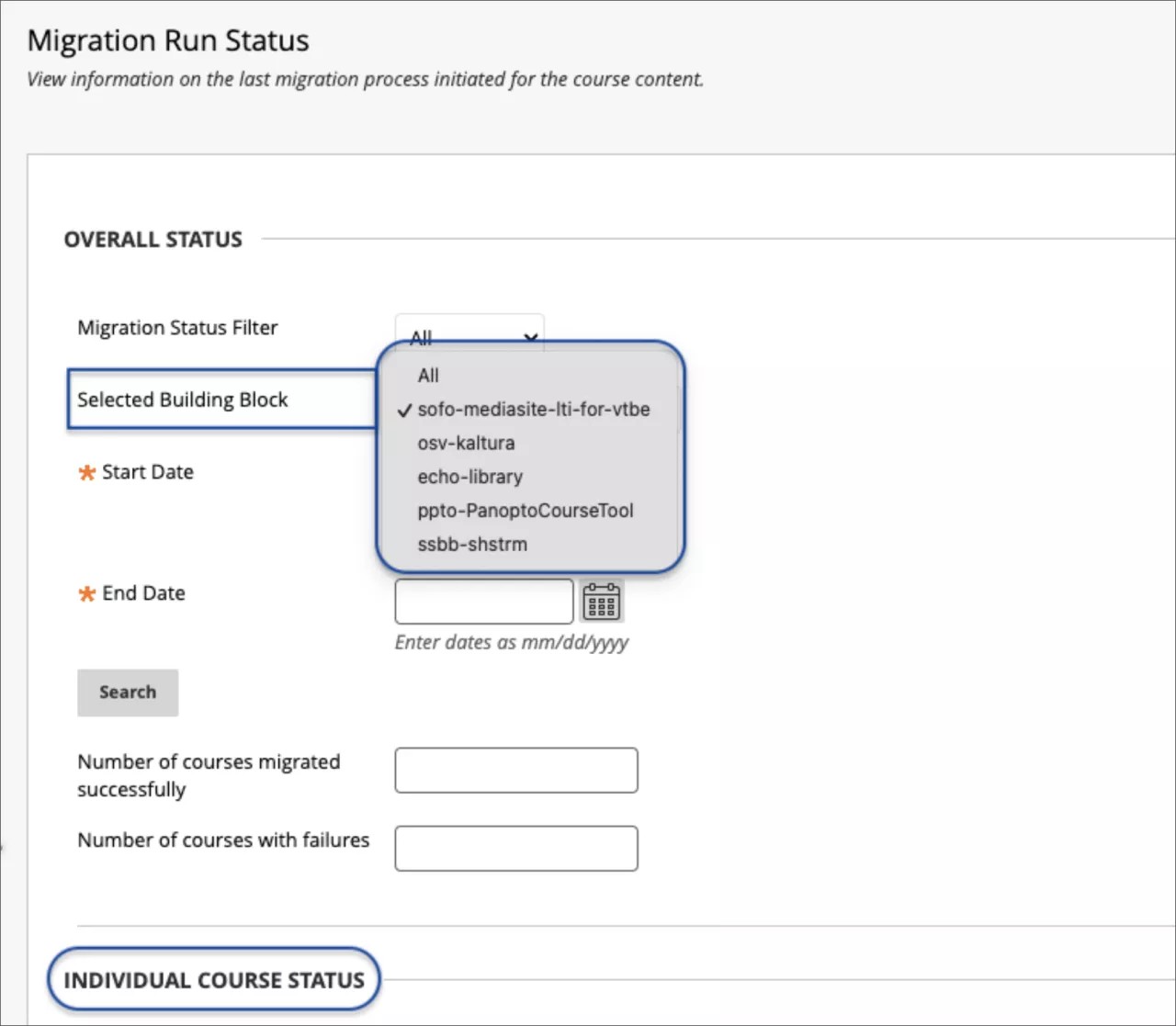
Administrators can monitor the status of a conversion process. Choose MediaSite as the Building Block. Define the start and end dates to find the desired migration task. Select Search. The results will indicate the number of courses that were successful, and the number of courses with failures.
Image 5. Checking the status of a migration task
For administrators: If a course contains content from MediaSite, ShareStream, Panopto, Kaltura and/or Echo360 building blocks, the conversion process must be performed once for each Building Block.
Converting Building Block content to LTI: Automatic Conversion – 3900.86
Blackboard Learn SaaS, Blackboard Learn 9.1
Original Experience
Original Course View
Impact: Administrators
Related topic: Convert Building Blocks to LTI
Many Original courses contain content links for the partners listed below. Now, we auto-convert Building Block links for these partner contents to LTI when importing an Original course or restoring an Original course archive.
- Kaltura
- Echo360
- Panopto
- ShareStream
- MediaSite
The automatic conversion ensures that course content transitions to LTI. This will promote consistency and adaptability across the platform.
For administrators: To ensure the auto-conversion of building block links to LTI, please review the following:
- The administrator must configure each building block in the Migration Service Settings section of the Conversion tool in the Admin Panel Settings.
- The administrator must configure each associated LTI integration before converting the links.
- The administrator will have the capability to enable/disable this functionality through a feature flag via a support ticket.
Rubric Associations API Enhancements – 3900.86
Blackboard Learn SaaS, Blackboard Learn 9.1
Ultra Experience, Original Experience
Ultra Course View, Original Course View
Impact: Administrators
Related topic: Learn APIs
Rubrics serve as a well-organized and transparent framework for assessing student work. Administrators can now manage associations for rubrics via API for the following:
- tests
- assignments (without questions)
- graded discussions
- individual questions (Original course view only)
Managing rubrics and their associations via API streamlines rubric alignment across many courses.
Administrators can now use the enhanced API to perform the full spectrum of CRUD operations: create, update and delete rubric associations.
Developers will gain access to the following endpoints:
- POST: public/v1/courses/{courseId}/rubrics/{rubricId}/associations
- PATCH: public/v1/courses/{courseId}/rubrics/{rubricId}/associations/{rubricAssociationId}
- DELETE: public/v1/courses/{courseId}/rubrics/{rubricId}/associations/{rubricAssociationId}
For administrators: Refer to the API documentation for detailed information about entitlements to perform CRUD operations on Rubric Associations.
Upgrade to Ultra
Moodle Conversion Improvements – 3900.86
Blackboard Learn SaaS, Blackboard Learn 9.1
Ultra Experience, Original Experience
Ultra Course View, Original Course View
Impact: Instructors
These improvements will not be available immediately in the release to Test/Stage environments for the 3900.86 release. We will update this note and send an email notification to followers of this page when it becomes available.
We continue to make progress on improving the conversion of Moodle courses. With this update, we're adding support for converting the following Moodle Question Types:
- Multiple Choice (Single Answer)
- Multiple Choice (Multiple Answers)
- True/False
- Matching
- Short Answer
- Numerical
- Essay
- Calculated
- Calculated Multichoice (Single Answer)
- Calculated Multichoice (Multiple Answers)
- Calculated Simple
For administrators: This feature will be available for all courses. There are no configurations needed.
Learn SaaS release 3900.84.0
Blackboard Learn SaaS Continuous Delivery v3900.84.0
Release to Test/Stage: Tuesday, 9 January 2024 | Release to Production: Thursday, 1 February 2024
Original Experience, Ultra Experience
Original Course View, Ultra Course View
For full feature details please review the corresponding notes for the Learn 3900.84.0 version included below on this page. Details can also be found on Behind the Blackboard.
Latest release: 3900.84.0-rel.49+3c179b0 to Production servers to take place on 29 February 2024.
For more information on updates and bug fixes, please visit Behind the Blackboard.
February 2024 – 3900.84 Release
The February 2024 - 3900.84 release is robust with features in 8 areas:
- Tests and assignments;
- Communication and collaboration;
- Flexible grading;
- Gradebook;
- Learner progression and personalized experience;
- Integrations;
- Learn core and security, and;
- Upgrade to Ultra
These improvements impact instructors, students, and administrators. Some features do require administrative action.
Instructors:
- Forms
- Likert question type
- Rubrics performance level descriptions: Display choice persists
- Send reminders from gradebook: Improved student count for instructors
- Audio/Video Recording in feedback: Usability improvements
- Missed due dates included in the Course Activity report
- Long student names visibility in the Course Activity report
Instructors and students:
Instructors and Administrators:
- Limit enrollment management actions based on data source key of enrollments
- Import Moodle packages
- Better control over "Student Alerts" notifications for instructors
Administrators:
Integrations
Google Workspace: Add a second primary domain – 3900.84
Blackboard Learn SaaS, Blackboard Learn 9.1
Ultra Experience, Original Experience
Ultra Course View, Original Course View
Impact: Administrators
We've finalized the addition of this feature and will release it to client production instances or client environments during the week of January 15 to 22.
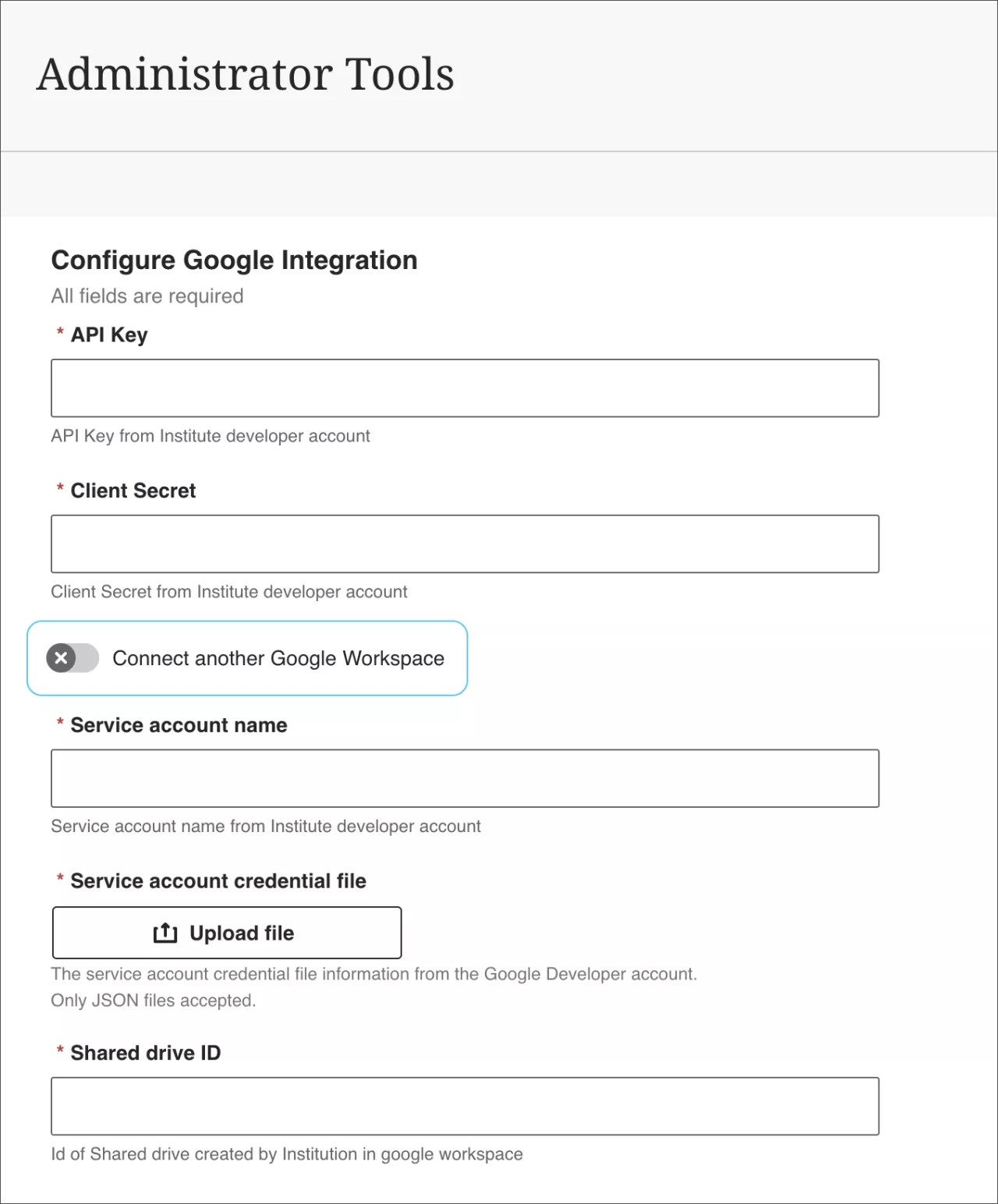
Some institutions manage two primary Google Workspaces: one for instructors and one for students. Now, The Google integration for Blackboard Learn permits the addition of a second workspace. This allows students to access Google Files added to the course from their instructor. Students can log in with their Google Workspace accounts to access the content.
Enable “Connect another Google Workspace” to configure a second workspace. Be sure to enter a Client ID, API Key, and Client secret copied from Google Cloud. Also, make sure to configure the Consent Screen.
As part of the configuration process, ensure that the Authorized redirect URIs, already mentioned in the Help documentation, are accurately entered in the newly created Consent Screen in the Additional/Secondary Workspace.
Image 1. Configure a Google Integration
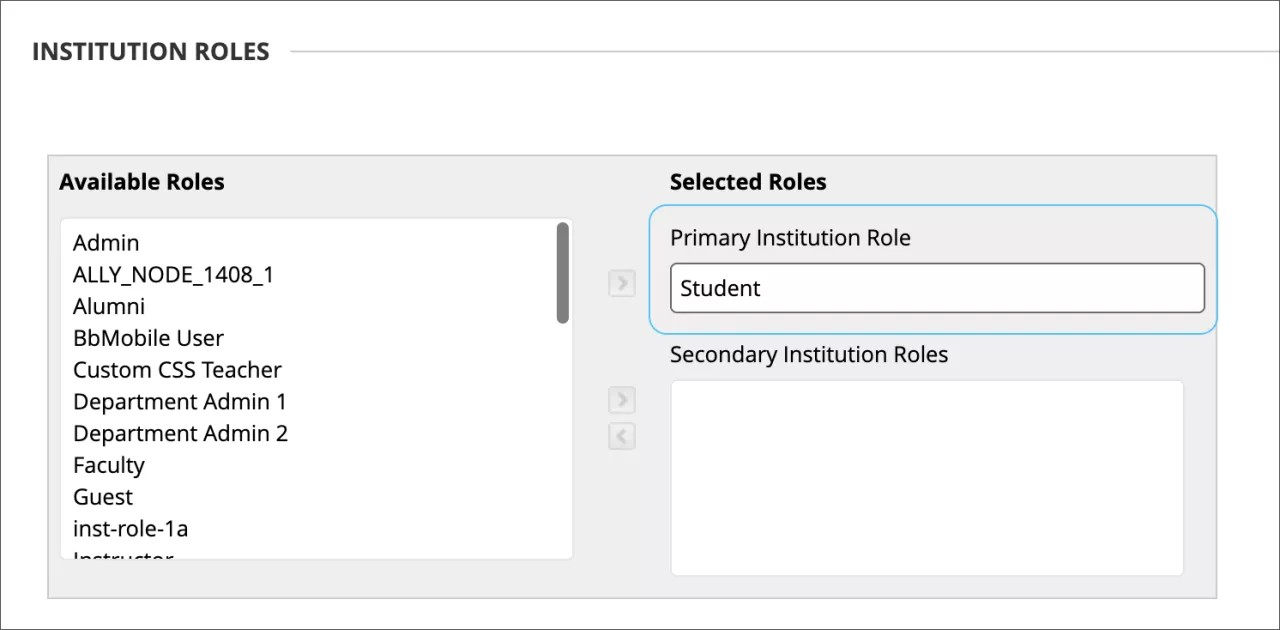
Ensure that student users have an Institutional Role set to Student.
Image 2. Institution Role options for a student user
For administrators: This feature is available for all Ultra and Original courses. Access the Administrator Control Panel to configure.
Converting Building Block content to LTI: ShareStream course content - 3900.84
Blackboard Learn SaaS, Blackboard Learn 9.1
Ultra Experience, Original Experience
Ultra Course View, Original Course View
Impact: Administrators
ShareSteam is an integrated partner solution for managing and streaming video. In the past, it integrated with Original courses using Building Blocks. Its newer integration uses the Learning Tool Interoperability (LTI) standard. With support ending for Building Blocks, administrators may wish to assist instructors with updating links that were created in the past.
We’ve enhanced the link conversion tool to assist administrators with transitioning from the ShareStream Building Block to LTI. The link conversion tool supports these types of ShareStream video links:
- Content embedded with the Content Editor
- Mashup links
- Course tool content
Image 1. The administrator accesses the tool to convert Building Block content to LTI
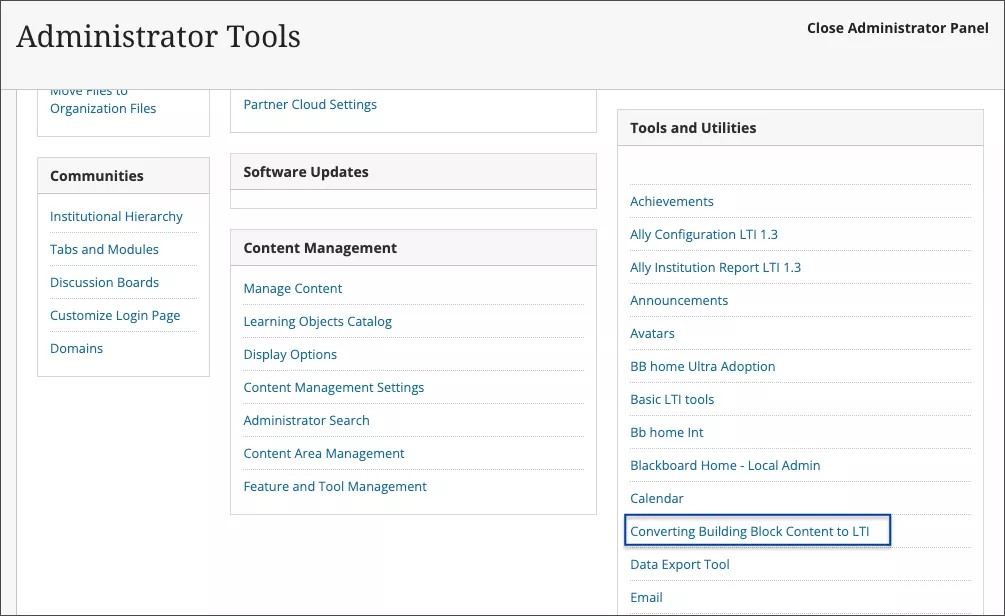
Image 2. The administrator selects the ShareStream Building Block and maps Building Block tools to LTI placements
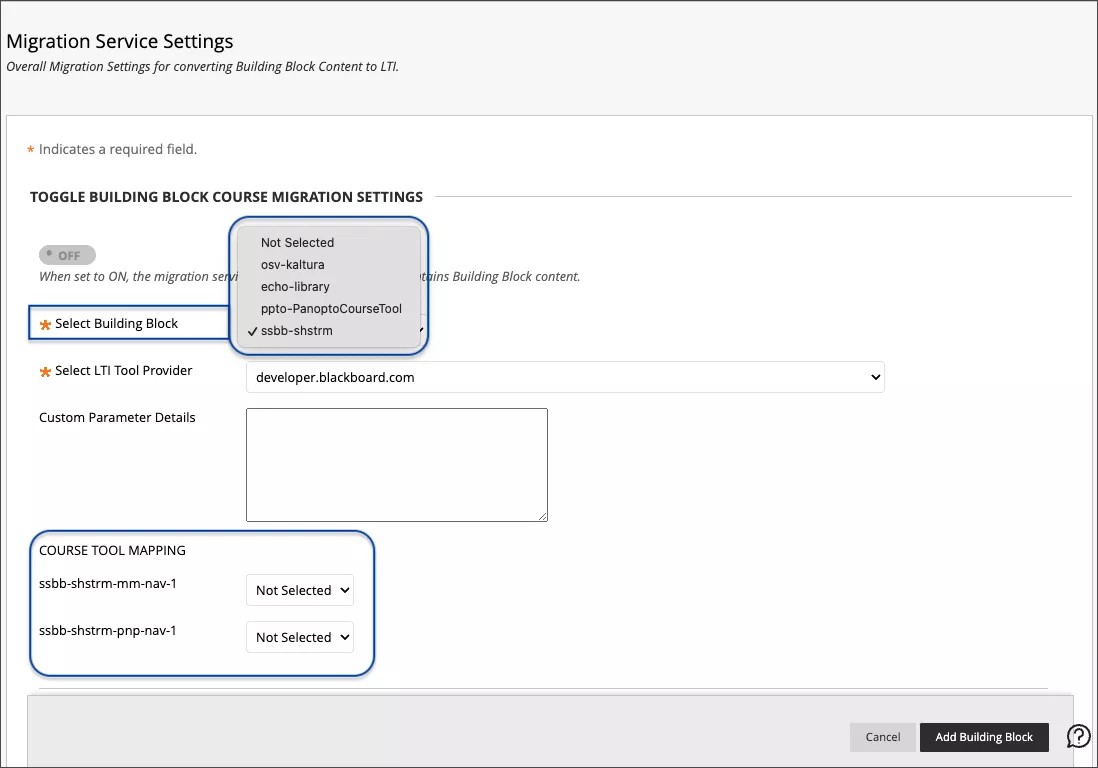
Administrators should select the ShareStream Building Block and the correct ShareStream LTI integration. Administrators must configure the ShareStream LTI integration before converting links. Custom parameters can be added if ShareStream informs you that this is required.
There are multiple ShareStream tools. These should be mapped to the correct LTI placements created by the administrator.
Image 3. Building block mappings can be viewed and edited
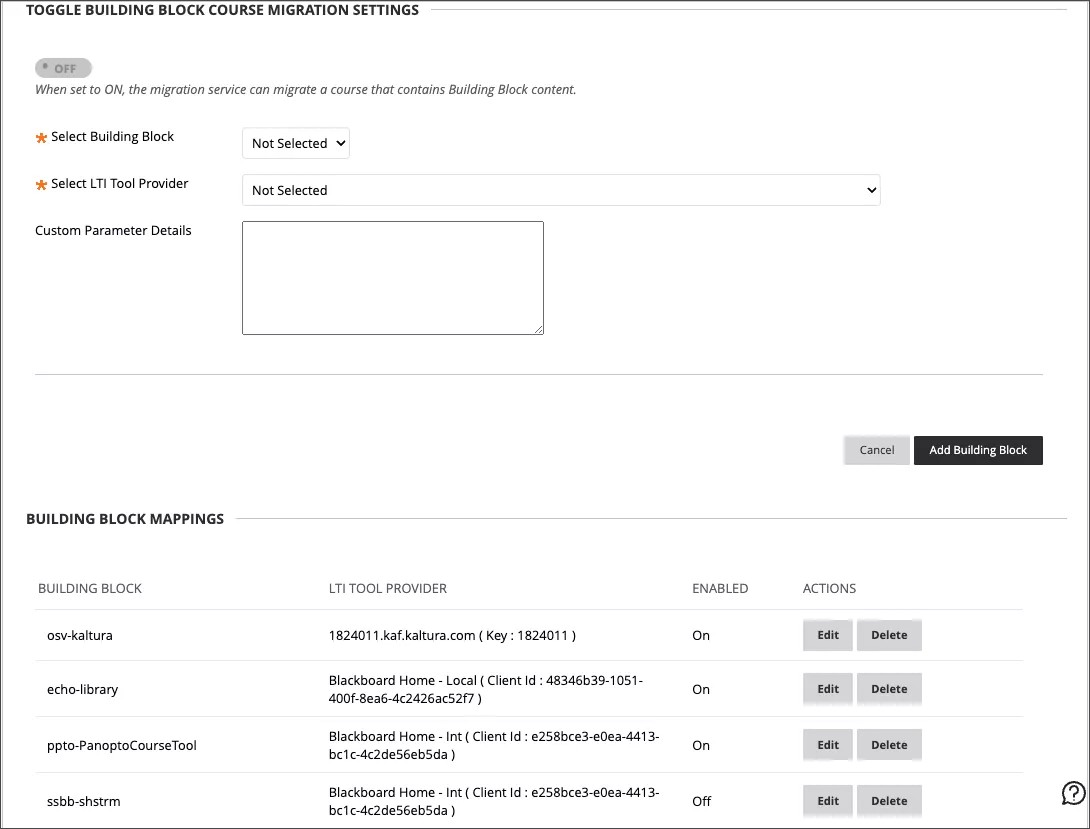
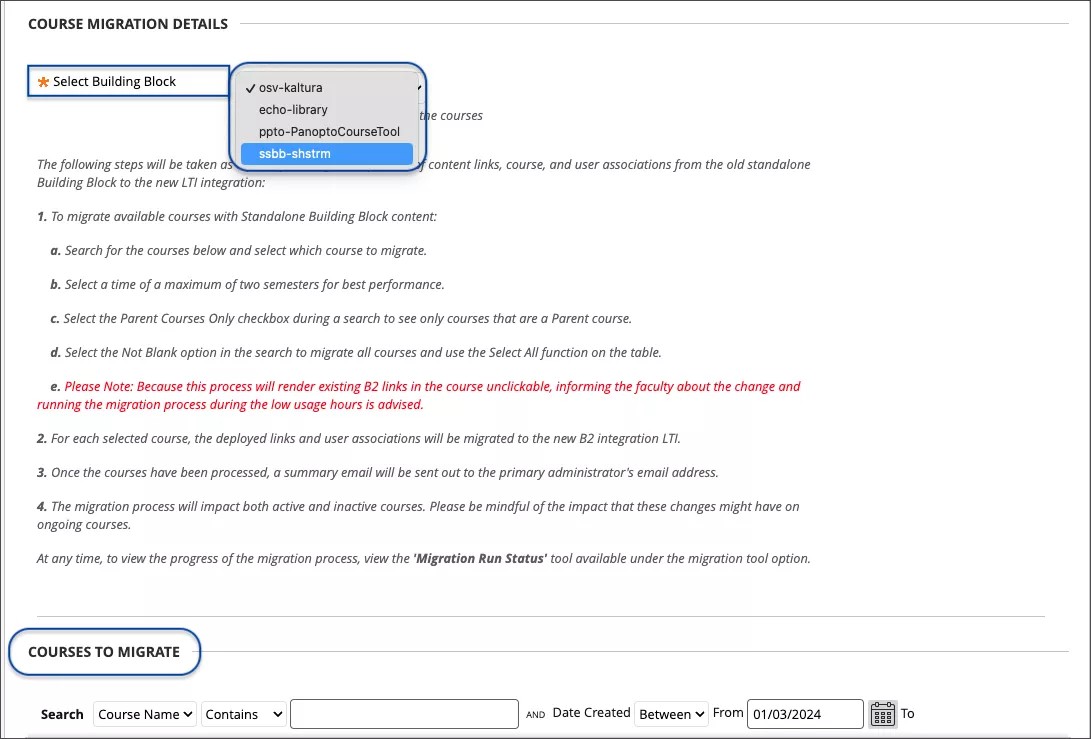
Next, an administrator will choose courses to be scanned for ShareStream links. Select the ShareStream Building Block. Use the course search tool to select courses for link migration.
Image 4. The administrator selects the ShareStream Building Block and chooses courses to migrate
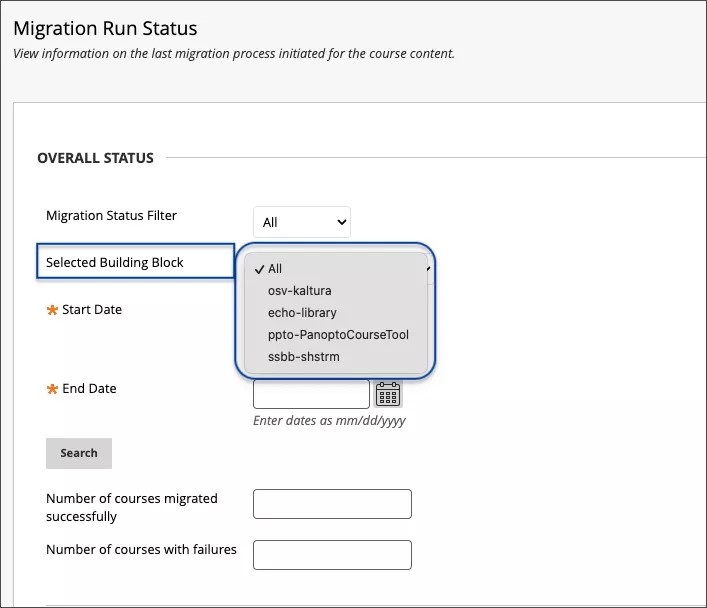
Administrators can monitor the status of a conversion process. Choose ShareStream as the Building Block. Define the start and end dates to find the desired migration task. Select Search. The results will indicate the number of courses that were successfully converted and the number of courses with failures.
Image 5. Checking the status of a migration task
For administrators: If a course contains content from ShareStream, Panopto, Kaltura, and/or Echo360 building blocks, the conversion process must be performed once for each Building Block.
Kaltura course content conversion - 3900.84
Blackboard Learn SaaS, Blackboard Learn 9.1
Original Experience
Original Course View
Impact: Administrators
We improved the tool that migrates Kaltura Building Block links to LTI links. It now supports converting links created with older versions of the Kaltura integration. Content added to Learn Original courses with the older Kaltura V1 and V2 Building Blocks will now convert. Also, the content can be converted to LTI 1.1 for all Kaltura versions.
Administrators can rerun the migration tool on courses if older Building Block links are not converted with previous conversion tasks.
For administrators: This improvement is part of the migration tool. The older Building Blocks embedded videos within tables and anchor tags. This content is now processed correctly. There is no need for additional steps or configurations.
Limit enrollment management actions based on data source key of enrollments – 3900.84
Blackboard Learn SaaS, Blackboard Learn 9.1
Ultra Experience, Original Experience
Ultra Course View, Original Course View
Impact: Instructors, Administrators
There are cases when instructors need to manage some course or organization enrollments.
Instructors may need to add co-instructors, assistants, or graders. However, institutional policy often mandates instructors should not alter records from a Student Information System (SIS).
Now, administrators can limit whether users can make changes to enrollment records based on how the enrollment was added. Enrollments added through the GUI belong to the SYSTEM data source. Enrollments added through integrations are assigned to other data sources based on configuration (non-SYSTEM).
The following Course/Organization Role privileges have been changed:
- Change the availability of enrollments
- Change a users’ roles in the course
- Set an instructor as primary instructor
- Remove (delete) users from the course
The 4 Course/Organization Role privileges have been split into 8 privileges—4 for enrollment records in SYSTEM and 4 for enrollment records not in SYSTEM. These are found in the privileges manager for each Course/Organization Role:
- Course/Organization Control Panel (Users and Groups) > Users > Remove System DSK Users from Course/Organization
- Course/Organization Control Panel (Users and Groups) > Users > Change System DSK User's availability in Course/Organization
- Course/Organization Control Panel (Users and Groups) > Users > Change System DSK User's Role in Course/Organization
- Course/Organization Control Panel (Users and Groups) > Users > Set System DSK instructor as primary in Ultra Course View
- Course/Organization Control Panel (Users and Groups) > Users > Remove Non-System DSK Users from Course/Organization
- Course/Organization Control Panel (Users and Groups) > Users > Change Non-System DSK User's Role in Course/Organization
- Course/Organization Control Panel (Users and Groups) > Users > Change Non-System DSK User's availability in Course/Organization
- Course/Organization Control Panel (Users and Groups) > Users > Set Non-System DSK instructor as primary in Ultra Course View
Administrators can configure each Course Role with the appropriate privileges for their policies. The privileges and restrictions are applicable to users in both Ultra and Original Course Views.
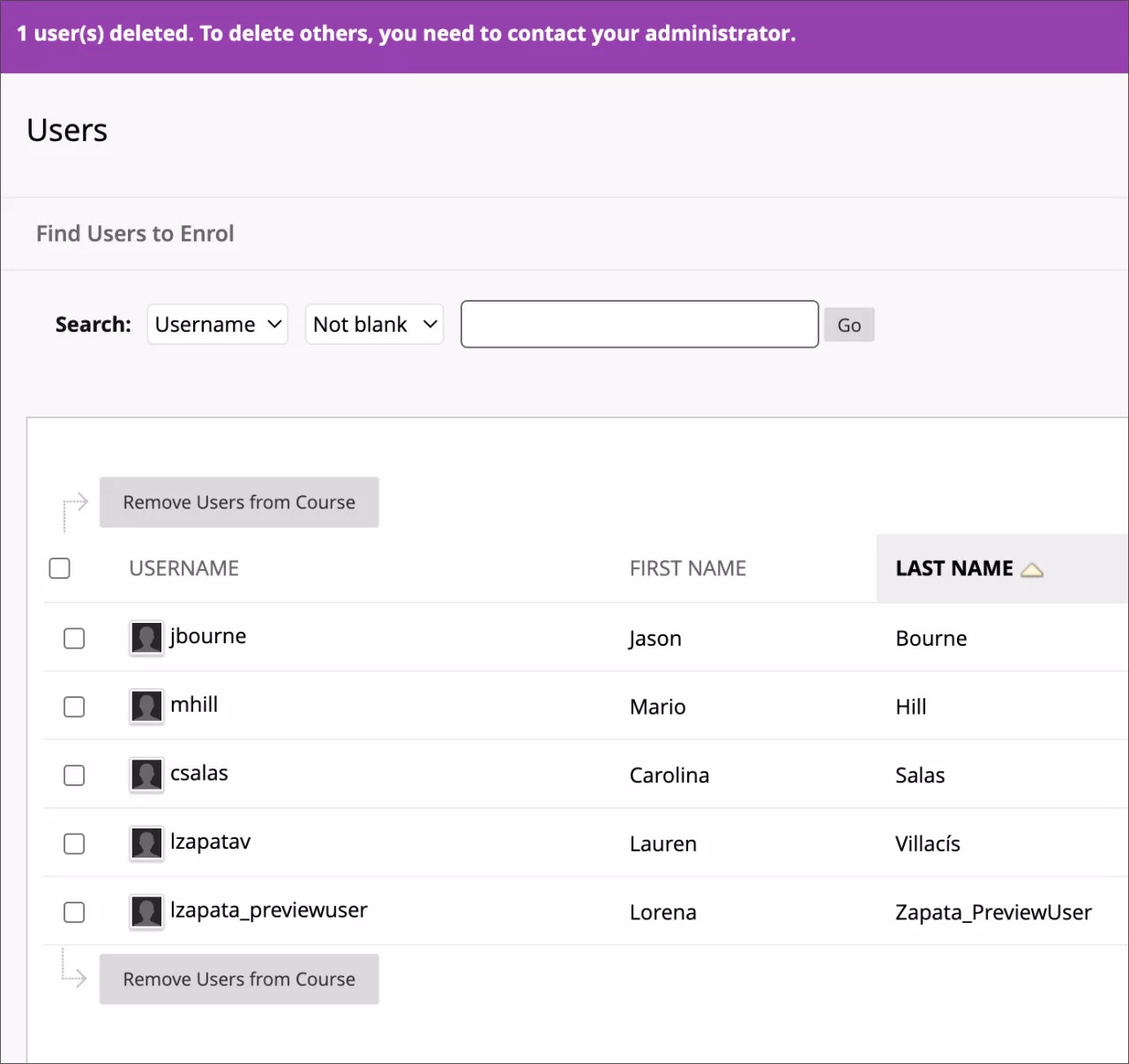
The Original Course View has a bulk remove action for enrollments. If the course user is restricted from removing any of the selected users, the action is stopped with a warning.
Image 1. Administrator sets the privileges for a Course Role
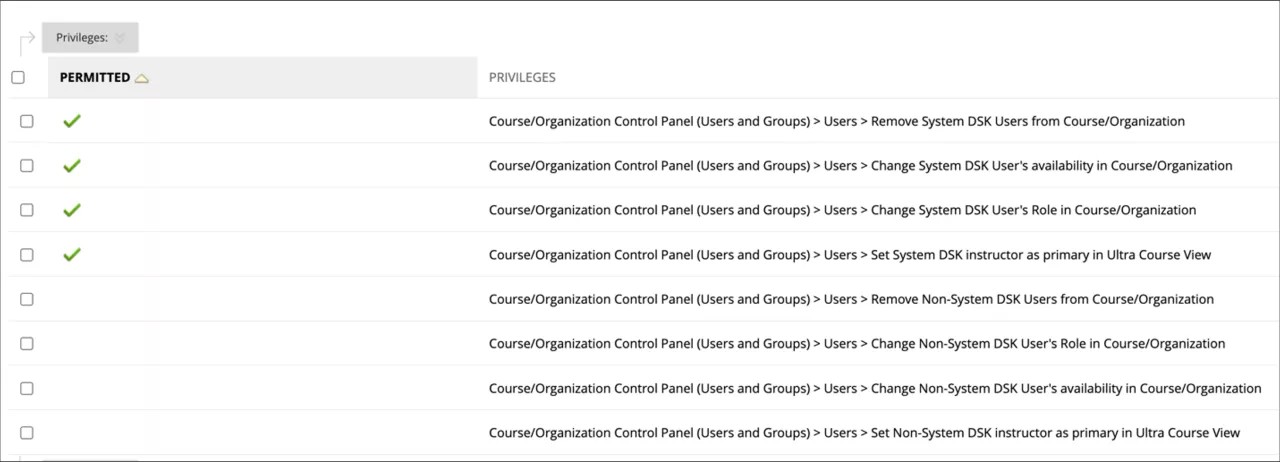
If the above entitlements related to System DSK Users are permitted and entitlements related to Non-System DSK Users are restricted, it will allow user to Remove, Edit Availability, Edit Roles and set Instructor as Primary for System DSK users only.
Image 2. Ultra example when Remove Non-System DSK Users’ entitlement is restricted
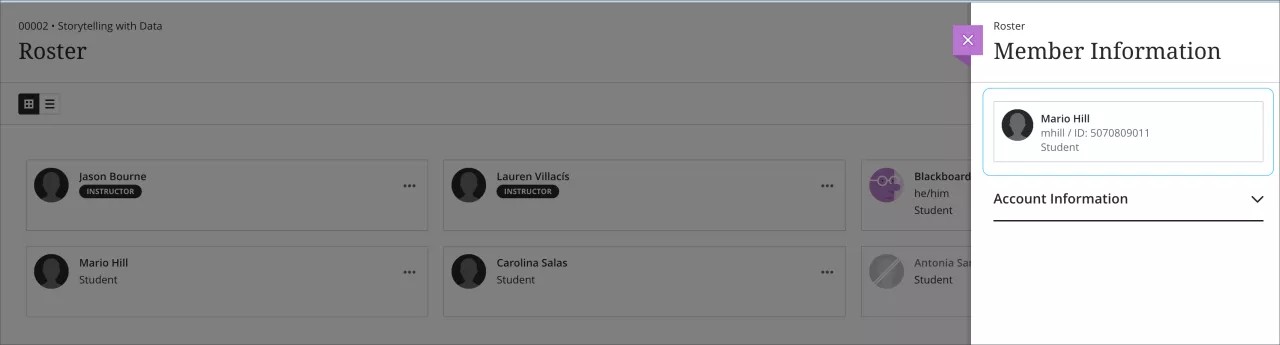
The remove member icon does not appear when a course user with no permissions tries to delete a Non-System DSK user.
Image 3. Ultra example when Remove System DSK Users’ entitlement is permitted
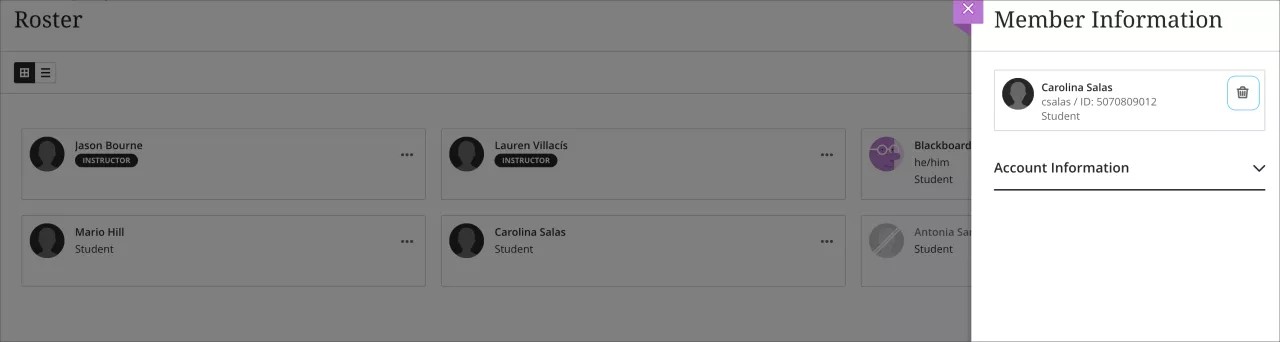
The remove member icon appears in the GUI when a course user with permissions tries to delete a System DSK user.
Image 4. Course user in Original Course View is restricted from a bulk remove action because they aren’t allowed to delete the selected users
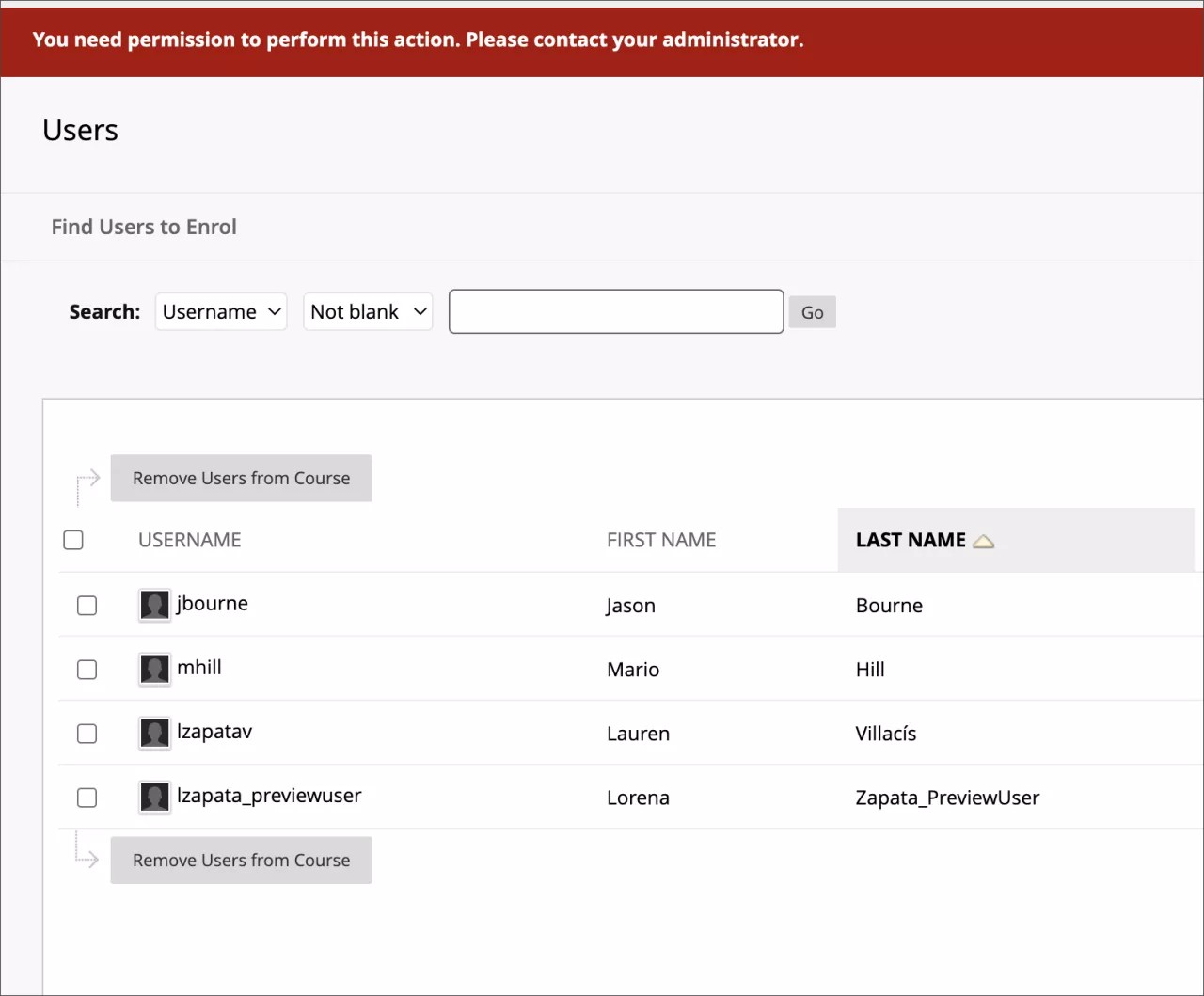
Image 5. Course user in Original Course View is restricted from a bulk remove action because they aren’t allowed to delete some of the selected users
The upgrade process should retain consistent behavior with the prior release. For example, if a Course Role had the privilege to remove users from a course/organization, they should now have the equivalent privileges:
- Remove System DSK Users from Course/Organization
- Remove Non-System DSK Users from Course/Organization
For administrators: We recommend that you review privileges configured for your Course Roles. You can adjust Course Role privileges to better conform to your institutional policies.
For administrators: A new Course Role privilege was added in this release, "Course Control Panel (Users and Groups) > Users > Enroll User for all roles." This privilege does not need to be configured as it will support an upcoming enhancement and does not yet serve a purpose. More information will come in upcoming release notes.
Upgrade to Ultra
Import Moodle packages – 3900.84
Blackboard Learn SaaS, Blackboard Learn 9.1
Ultra Experience, Original Experience
Ultra Course View, Original Course View
Impact: Instructors, Administrators
Switching from Moodle to Blackboard Learn Ultra is now easier than ever. Instructors can now import Moodle packages into Ultra and Original view courses themselves. This change removes instructor reliance on an administrator.
Image 1. Import Course Content
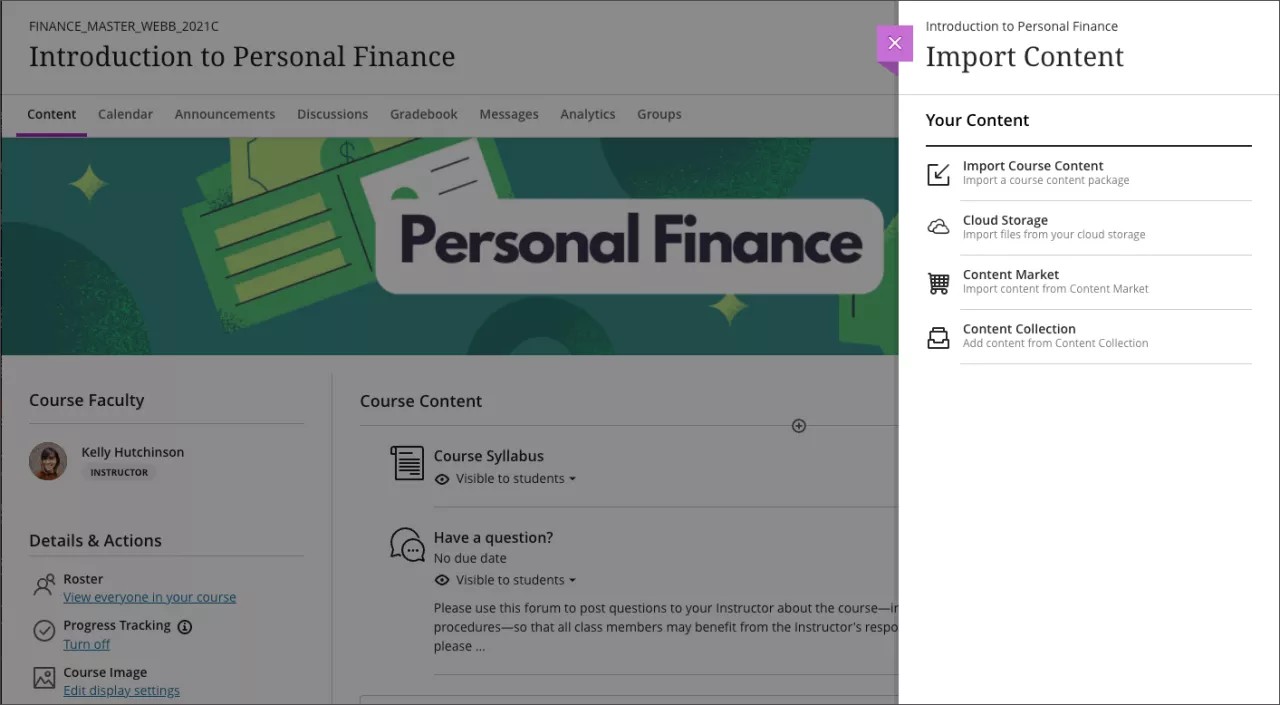
Learn more on importing courses from Moodle for more directions. We also have a guide to help you understand the differences in terminology.
For administrators: This feature is available for all Ultra and Original courses. There are no configurations needed.
January 2024 – 3900.82 Release
We're aware that updates to copy workflows for admins are causing issues and we're actively working on a resolution.
The January 2024 - 3900.82 is robust with features in 9 areas:
- Instructional design;
- Mastery learning / Competency based education;
- Tests and assignments;
- Flexible grading;
- Gradebook;
- Learner progression and personalized experience;
- Integrations;
- Mobile; and
- Upgrade to Ultra
These improvements impact instructors, students, and administrators. Some features do require administrative action.
Instructors:
- AI Design Assistant – Authentic Assessment prompt generation
- AI Design Assistant - Generate Rubric Improvements
- Delegated Grading improvements
- Improved attempt display in Flexible Grading
- Sorting controls in Students view for assessments graded anonymously
- Enhanced grid view
- Total & Weighted Calculations
- Category information on the Gradable Items page
- Original Course View: Updated options display when sending email from the Grade Center
- Attempt logs for enhanced assessment integrity
- Unused files management
- Batch Edit: Change to specific date and/or time
Instructors and students:
All users:
- Multi-Factor Authentication for the internal authentication method
- Mobile: Help Center and About sections added to More menu
Instructors and Administrators:
Administrators:
Original Course View: Updated options display when sending email from Grade Center – 3900.82
Blackboard Learn SaaS, Blackboard Learn 9.1
Original Course View
Impact: Instructors
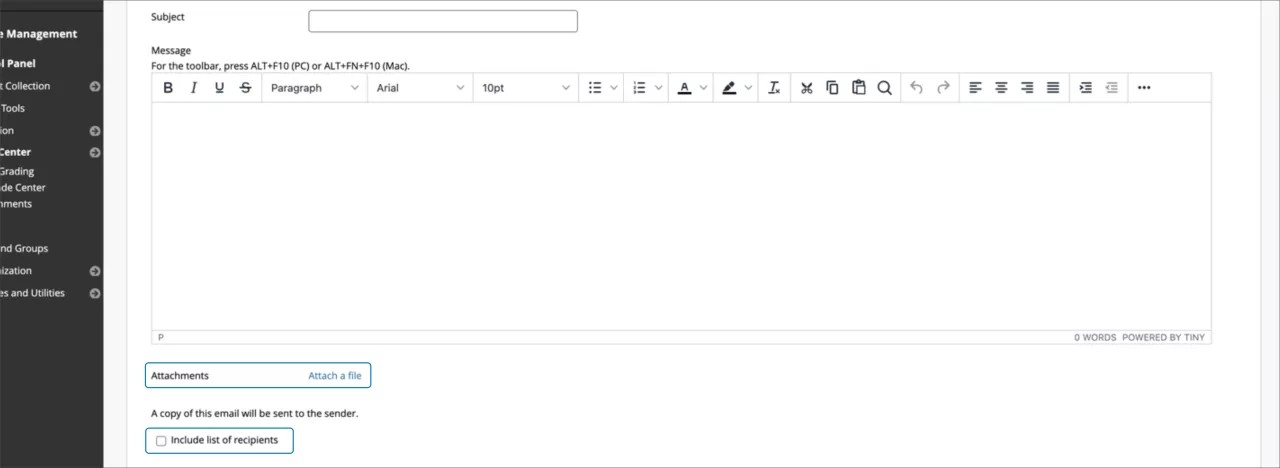
Instructors can send emails to students in places like the Grade Center and Retention Center. Previously, the option to include student names in the sender copy was misleading. The checkbox seemed to apply to both sending a copy of the message and including recipient names. We’ve improved the presentation to clarify the expected behavior. A copy is always sent to the sender. The sender can opt-in to including recipient names in their copy of the email.
Image 1. The options to add attachments and include the names of recipients are better organized
For administrators: This feature is available for all Original courses. There are no configurations needed
Upgrade to Ultra
Restricting Original Copy Workflows – 3900.82
We're aware that updates to copy workflows for admins are causing issues and we're actively working on a resolution.
Blackboard Learn SaaS, Learn 9.1
Original Experience
Original Course View
Impact: Instructors, Adminstrators
We had several issues related to copying items from Original to Ultra and Ultra to Ultra course view. The issues stemmed from users copying materials using Original workflows. The Original workflows opened the door for partial copies of items. The Original copy workflows were never designed or updated to support Ultra courses.
Here are two examples:
Example 1
The instructor would select "Discussions" and not select "Grade Center Columns and Settings." The discussions would copy without their associated grade center columns. The discussion would come over in a partial state and would not function. Instructors would need to delete and copy using the supported workflow.
Example 2
The instructor selects a "Content Area" with course links to discussions. They did not select "Discussions" or "Grade Center Columns and Settings." The course links copy. The course links don't function. The "Discussions" were not selected, and the course links have nothing to reference. Instructors would need to delete and copy using the supported workflow.
Previous Behaviors:
- Instructors could use Original workflows to Copy from Original to Ultra.
- Administrators could use Original workflows to copy from Original to Ultra.
- Administrators could use Original workflows to copy from Ultra to Ultra.
New Behaviors:
- Instructors can no longer use Original workflows to copy from Original to Ultra.
- Administrators can no longer use Original workflows to copy from Original to Ultra.
- Copy Course Materials into a New Course
- Copy Course Materials into an Existing Course
- Administrators can no longer use Original workflows to copy from Ultra to Ultra.
- Copy Course Materials into a New Course
- Copy Course Materials into an Existing Course
Alternatives
- Instructors can copy from an Original to Ultra using the copy items workflow.
- Administrators can copy from an Original to Ultra using the copy items workflow.
- Administrators can copy from Ultra to Ultra using the copy items workflow.
- Administrators can copy from Ultra to Ultra using the “Copy Course with Users (Exact Copy).
- Administrators can export a course package from Ultra to import into another Ultra course.
- Administrators can use the SIS Integration Framework to copy from Ultra to Ultra.
For administrators: This feature is available for all Ultra courses. There are no configurations needed.
Learn SaaS release 3900.82.0
Blackboard Learn SaaS Continuous Delivery v3900.82.0
Release to Test/Stage: Tuesday, 12 December 2023 | Release to Production: Thursday, 4 January 2024
Original Experience, Ultra Experience
Original Course View, Ultra Course View
For full feature details please review the corresponding notes for the Learn 3900.82.0 version included below on this page. Details can also be found on Behind the Blackboard.
Latest release: 3900.82.0-rel.51+579fa4e to Production servers to take place on 25 January 2024.
For more information on updates and bug fixes, please visit Behind the Blackboard.
Learn SaaS release 3900.80.0
Blackboard Learn SaaS Continuous Delivery v3900.80.0
Release to Test/Stage: Tuesday, 7 November 2023 | Release to Production: Thursday, 7 December 2023
Original Experience, Ultra Experience
Original Course View, Ultra Course View
For full feature details please review the corresponding notes for the Learn 3900.80.0 version included below on this page. Details can also be found on Behind the Blackboard.
Latest release: 3900.80.0-rel.28+80fe7a8 to Production servers to take place on 21 December 2023.
For more information on updates and bug fixes, please visit Behind the Blackboard.
December 2023 – 3900.80 Release
The December 2023 - 3900.80 is robust with features in 8 areas:
- Instructional design;
- Tests and assignments;
- Flexible grading;
- Gradebook;
- Integrations;
- Learn core and security;
- Mobile app; and
- Upgrade to Ultra
These improvements impact instructors, students, and administrators. Some features do require administrative action.
Instructors:
- Authentic Discussion and Journal prompts
- Large rubric support
- Group assessment due date exceptions
- Goal alignment to questions in banks
- Prevent students from earning full credit when selecting all answers choices on a multi-select question with partial credit
- Sorting controls in Students and Questions tab
- Grid view sorting controls
- Automatic zero gradebook improvement
- Canvas conversion improvements: Support for Multiple Grade Schemes
Instructors and students:
All users:
Administrators:
Integrations
Gradebook API: Accessing grading dates – 3900.80
Blackboard Learn SaaS, Blackboard Learn 9.1
Ultra Experience, Original Experience
Ultra Course View, Original Course View
Impact: Administrators
Related topic: Learn APIs
In a previous release, we introduced a feature that allows users to retrieve date-related grading data. Now, we incorporate two more fields into the response of all gradebook APIs: first and last relevant dates.
"firstRelevantDate" determined as:
- The first recorded date when an attempt is scored.
- The most recent date in which a final score is overridden.
"lastRelevantDate" determined as:
- The date of the most recent modification of a grade when an attempt is scored.
- The most recent date in which a final score is overridden.
We also introduce the following query parameters:
- firstRelevantDateCompare
- lastRelevantDateCompare
These parameters allow users to filter and refine the results.
For administrators: The required entitlements for Gradebook API remain unchanged. First and Last relevant dates do not apply to calculated columns.
Enhanced user data retrieval with secondary IDs via REST API - 3900.80
Blackboard Learn SaaS, Blackboard Learn 9.1
Ultra Experience, Original Experience
Ultra Course View, Original Course View
Impact: Administrators
Related topic: Learn APIs
The option to retrieve user data is crucial for administrators and support roles. User data retrieval is important for a host of reasons. For example, it allows institutions to ensure access control, user support, and data security.
In the past, retrieving user data depended on a single ID. Now, we are expanding the capabilities of the users' REST APIs to support secondary IDs. This will provide more flexibility and control when accessing user information.
Users can now use a secondary ID:
- Contact Email: Users can now use the "contact.email" secondary ID to retrieve user data. This enhancement allows users to access their information by their institution/personal email address.
- Student IDs: The "studentId" secondary ID is now supported in the GET /users public endpoint. You can use this feature to access user data using their student ID.
- "Name" as New Attribute: Users can now retrieve user data based on attributes such as the user name. For this, we have the new query parameter "?name=". This will allow filtering by full names (first names, last names, middle names, or usernames).
These changes provide a significant improvement in the way users can manage user data via REST APIs.
For administrators: The required entitlements for User API remain unchanged.
REST API for accessing assessment passwords - 3900.80
Blackboard Learn SaaS, Blackboard Learn 9.1
Ultra Experience, Original Experience
Ultra Course View, Original Course View
Impact: Administrators
Related topic: Learn APIs
In Learn, assessments can be protected with access codes. Access codes help provide integrity and security for assessments.
To improve the integration with proctoring services, we extended the access code option via REST API.
Now, users can retrieve the access password configuration settings. The configuration setting is for both Ultra and Original courses. This information includes the following key fields:
- Enabled: Flag that indicates whether the assessment is password-protected or not.
- Password: This field contains the 6-digit passcode. The password is available in plain text, simplifying the integration process.
Furthermore, these fields will be accessible through the following Content endpoints:
- GET /learn/api/public/v1/courses/{courseId}/contents
- GET /learn/api/public/v1/courses/{courseId}/contents/{contentId}
For administrators: The required entitlements for Users API remain unchanged.
Converting Building Block content to LTI (Echo360 Course Content) - 3900.80
Blackboard Learn SaaS, Blackboard Learn 9.1
Original Experience
Original Course View
Impact: Administrators
In the past, some clients relied on building blocks to enhance course content. To help clients transition from building blocks to LTI tools, we created a Content Migration Tool. This tool focuses on helping clients migrate Kaltura content within Original courses.
We have now updated the migration tool to support the conversion of building blocks content to LTI. This change helps mitigate challenges with migrations from Original to Ultra courses.
Now, administrators can also convert Echo360 content from building blocks to LTI.
This conversion supports the Building Block content present within the iframe. This includes Mashup links within the content editor:
- wikis, journals, discussions, groups
- assessments, assignments, test questions, and question banks
- announcements
As before, administrators can access the Building Block to LTI content conversion service through Administrator Tools.
Image 1. Converting Building Block Content to LTI
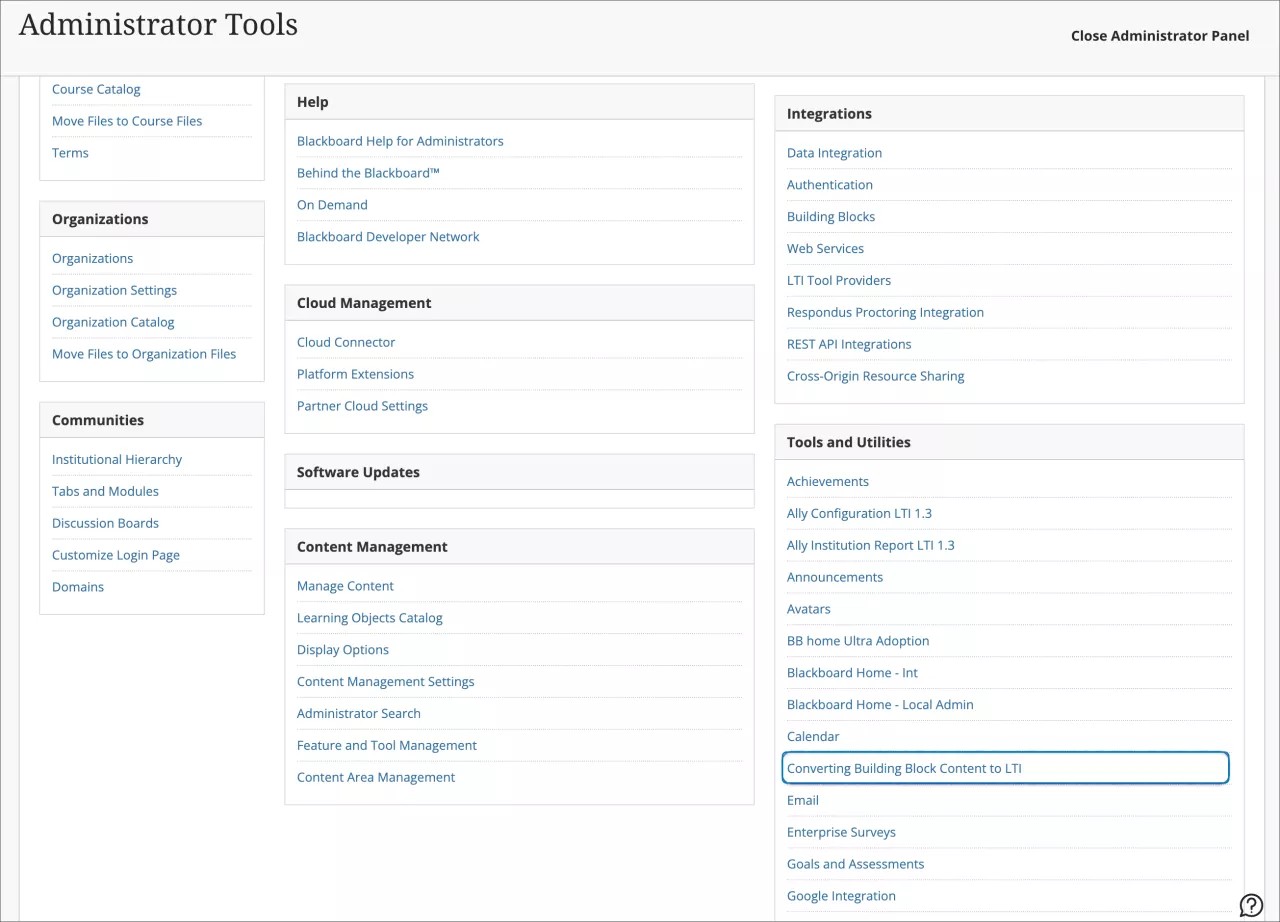
Image 2. Migration Service Settings
Administrators can select from a drop-down menu the building block to be configured. The options are Echo360 and Kaltura.
Administrators can configure the required IDs and custom parameters for the conversion details.
Image 3. Migration settings for Echo 360 and Kaltura
Building blocks mappings are displayed. Administrators can select whether they want to edit, delete, or turn off the building block for the conversion tool.
Image 4. Building block mappings
Once configurations are set, administrators can manage the placements. They can select for the specific Building Block the courses to which they want to convert the content.
Image 5. Migrate courses with building block content
Finally, at Migration Run Status, users can monitor the status of the conversion process for each course.
Image 6. Migration run status
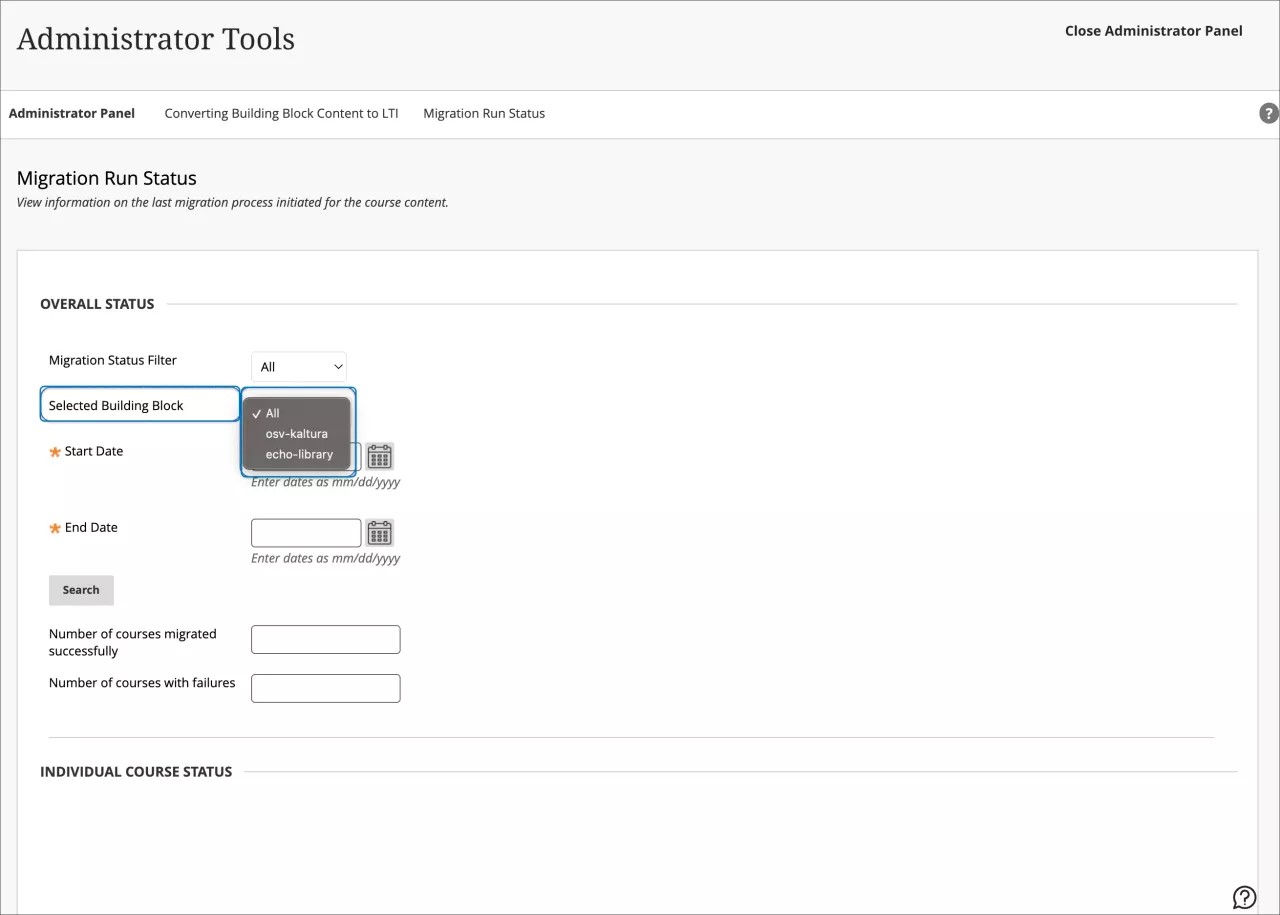
For administrators: If the same course contains content from both Kaltura and Echo360 building blocks, the conversion process must be performed once for each building block.
Mobile App
Enhancements to Grades – 3900.80
Blackboard Learn SaaS
Ultra Experience, Original Experience
Ultra Course View, Original Course View
Impact: Instructors, Students
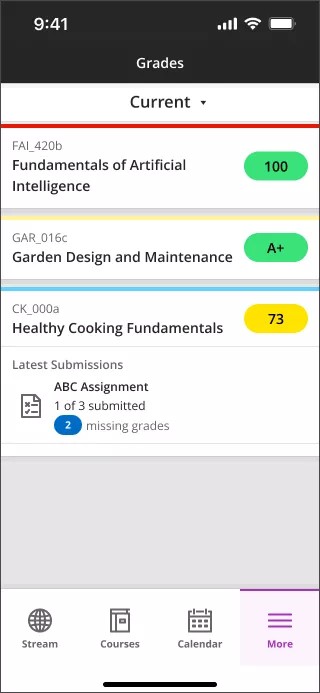
In response to user feedback, we've made improvements to the Grades page. The Grades page now offers more comprehensive information for students and instructors. We enhanced both the appearance and functionality.
For Instructors:
- Upcoming Grading
- Upon expansion, instructors find items that need grading.
- Concise View
- We've limited the display to only three items at a time.
- A Show More link is available, leading to the gradebook for that course.
- Efficient Navigation
- Instructors can access grading tasks by selecting the respective item.
- In the past, grade pills were black. Now grade pills display corresponding grade colors.
Image 1. Instructor view of Grades
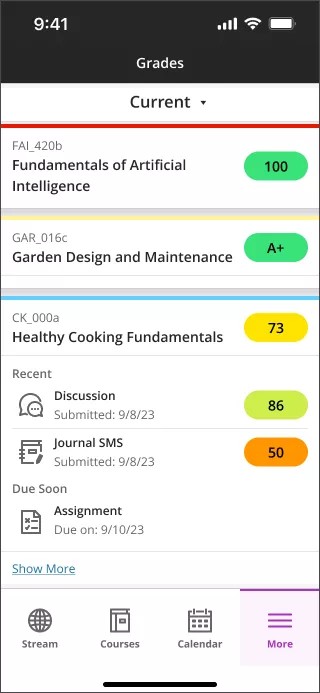
For Students:
- Upcoming Due Items
- When expanding the section, students now find items that are due within a week.
- Recently Graded
- Expanded sections display items that have been recently graded.
- Concise View
- To avoid clutter, we've limited the display to only three items at a time.
- A Show more link is available, leading to the gradebook for that course.
- Quick Access
- By selecting any item, users can navigate to the specific assessment or activity.
- In the past, grade pills were black. Now grade pills display corresponding grade colors.
Image 2. Student view of Grades
For administrators: No additional settings are required for this feature.
Canvas conversion improvements: Support for Multiple Grade Schemes – 3900.80
Blackboard Learn SaaS
Ultra Experience, Original Experience
Ultra Course View, Original Course View
Impact: Instructors
The Canvas Learning Management System allows instructors to create Grade Schemes. Grade schemes can use point or percentage ranges. Each point or percentage range has a name value.
Image 1. A Grade Scheme in Canvas
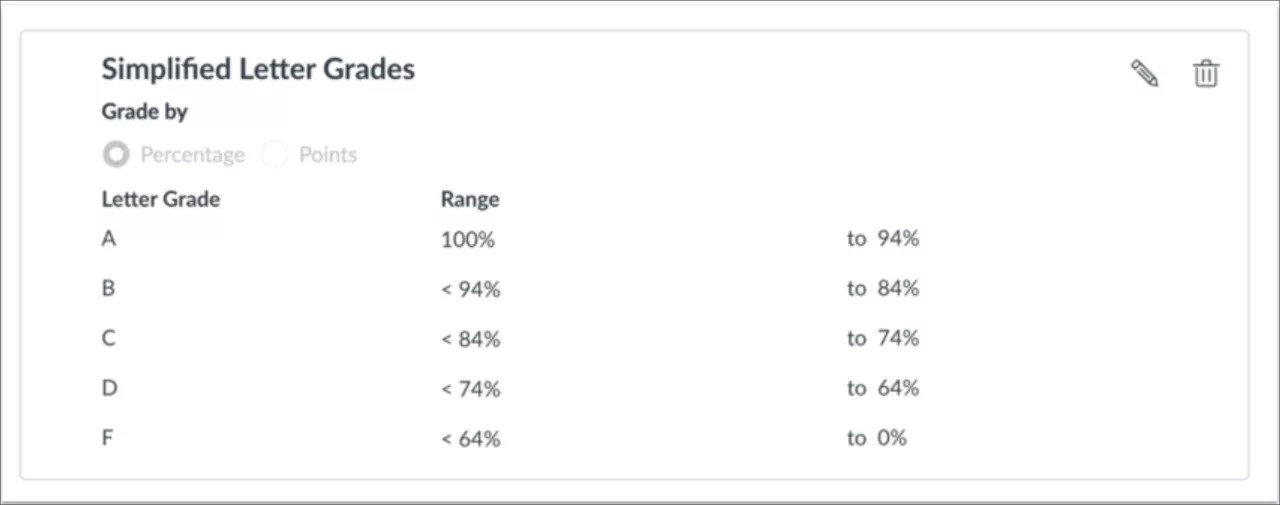
In the past, Grade Schemes in Canvas did not convert. We have updated the conversion so that Grade Schemes from Canvas are now preserved. Instructors no longer need to rebuild Grade Schemes when converting a course from Canvas.
For administrators: This feature is available for all Original and Ultra courses. There are no configurations needed.
Release notes for earlier versions
Release notes for earlier versions available in English only:
Return to top of the Archived Release Notes page


